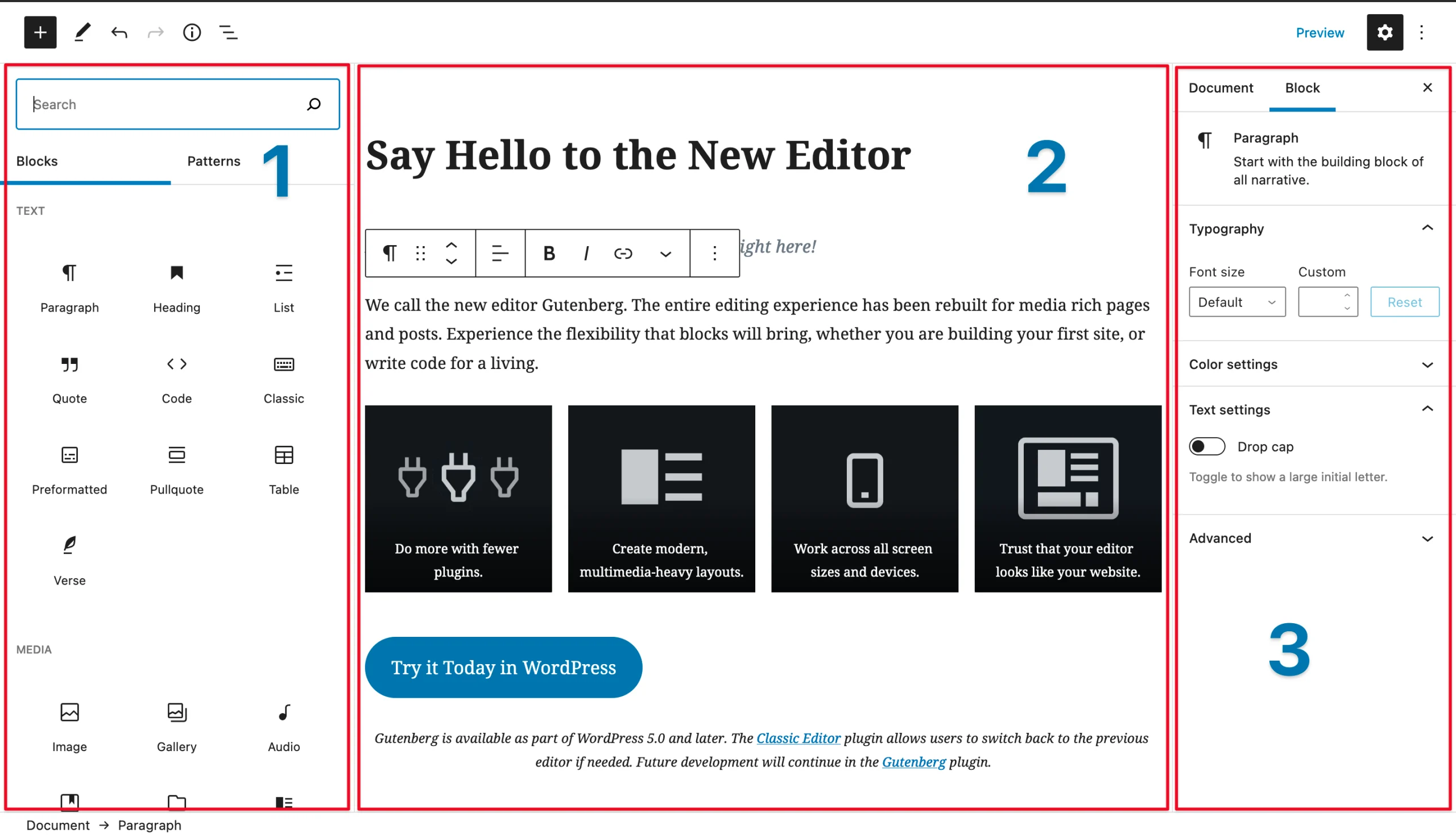

The Block Editor, also known as Gutenberg, is a content creation tool introduced in WordPress 5.0 that revolutionizes the way users create and manage content. This modern editing interface allows users to build posts and pages using a block-based approach, enhancing flexibility and creativity in website and hosting design. Here’s an in-depth look at the Block Editor, its features, benefits, and its impact on the WordPress ecosystem.
Understanding the Block Editor
Before the introduction of the Block Editor, WordPress primarily used a classic editor that relied on a single text area for content input. This traditional method limited users in terms of layout and design options. The Block Editor, however, breaks down content into individual blocks, each serving a specific purpose, such as text, images, galleries, videos, and more.
Each block can be customized independently, allowing for greater creativity in how content is arranged and displayed. Users can easily add, remove, and rearrange blocks, facilitating a more dynamic editing experience.
Key Features of the Block Editor
- Block Types: The Editor includes a wide variety of blocks, such as paragraphs, headings, lists, images, galleries, audio, video, buttons, and more. Each block type has its own set of customization options, making it easy to create rich and varied content.
- Reusable Blocks: Users can create and save blocks for reuse across different posts and pages. This feature is particularly useful for consistent branding elements, such as call-to-action buttons or standard content sections.
- Drag-and-Drop Functionality: The intuitive drag-and-drop interface allows users to rearrange blocks easily. Users can click and drag to change the order of content, making it straightforward to refine layouts without technical skills.
- Block Patterns: It supports predefined block patterns, which are sets of blocks designed to work together. These patterns can be used to quickly create complex layouts without starting from scratch.
- Inline Editing: It supports inline editing, meaning users can modify text and block settings directly within the content area. This functionality streamlines the editing process and provides immediate visual feedback.
- Custom Block Development: Developers can create custom blocks tailored to specific needs. This extensibility allows for an even wider range of functionality, enabling unique solutions for different types of content and industries.
- Integration with Plugins: Many popular plugins have been adapted to work seamlessly with the Block Editor. This integration enhances the editor’s capabilities, allowing users to add forms, sliders, and other wordpress features without leaving the editing screen.
Benefits of Using the Block Editor
- Enhanced User Experience: The Block Editor is designed to be user-friendly, with an emphasis on visual editing. This approach makes it easier for users, particularly those without technical skills, to create professional-looking content.
- Flexibility and Customization: The block-based approach allows users to design their content layouts creatively. Users can combine different block types to create visually appealing pages tailored to their audience.
- Efficiency: The ability to reuse blocks and utilize block patterns can save time, especially for users who need to create similar content across multiple pages or posts.
- Mobile-Friendly Editing: The Block Editor is optimized for mobile devices, allowing users to edit their content on the go. This feature ensures that users can manage their sites effectively, regardless of their location.
- Future-Proofing: With the Block Editor being the default content editor in WordPress, it is continuously updated and improved. Using the Block Editor positions users to take advantage of future enhancements and features as WordPress evolves.
Impact on the WordPress Ecosystem
The introduction of the Block Editor has significantly changed the WordPress landscape. It has encouraged a shift towards more flexible and innovative content creation. This change has led to:
- A New Wave of Themes and Plugins: Developers are increasingly creating themes and plugins designed specifically for the Block Editor, resulting in a richer ecosystem of tools and features.
- Focus on Content Creation: The Block Editor emphasizes content creation, encouraging users to prioritize high-quality, engaging content over technical aspects of web design.
- Community Engagement: The WordPress community has rallied around the Block Editor, contributing to its development and offering support through tutorials, documentation, and forums. This collaboration has fostered a sense of community and shared knowledge among users.
Conclusion
The Block Editor in WordPress represents a significant evolution in how users create and manage content. By adopting a block-based approach, WordPress has made content creation more intuitive, flexible, and visually engaging. With a wealth of features designed to enhance user experience and streamline workflows, the Block Editor has become an essential tool for anyone looking to build and manage a website effectively.
As WordPress continues to grow and evolve, the Block Editor will play a pivotal role in shaping the future of content management, making it an exciting time for both new and seasoned users. Whether for blogs, portfolios, or educational institutions, the Block server provider the tools necessary to create impactful online experiences.